
Virtual Office Online: Guide to Shared Virtual Workspaces

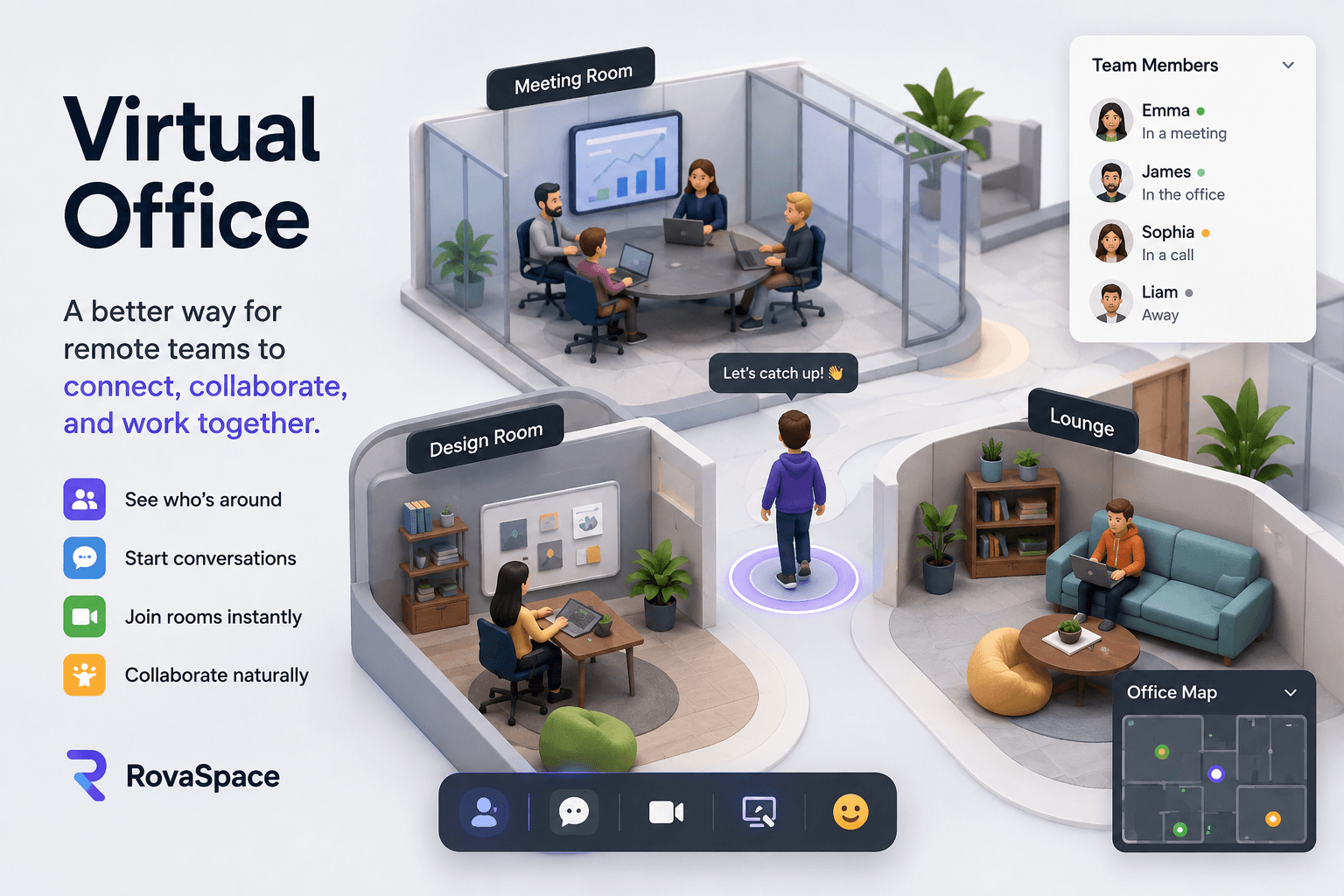
Virtual Office: What It Is, How It Works, and Why Remote Teams Use One
Remote work has changed where people work, but it has not eliminated the need for teams to feel connected.
When everyone works from different locations, employees can communicate through chat, email, and video meetings. However, something is still missing: the feeling of knowing what is happening around you.
A virtual office online creates a shared virtual workspace where remote employees can work, communicate, meet, and stay aware of their teammates throughout the day.
Instead of replacing remote work with a traditional office, a virtual office brings some of the awareness and connection of an office into the remote workplace.
What Is a Virtual Office?
A virtual office online is a shared virtual workspace designed to give remote teams a shared place to work and communicate.
Unlike traditional communication tools that focus on individual conversations, a virtual office can provide a persistent environment where team members can see who is working, move between spaces, start conversations, join meetings, and collaborate.
A virtual office online can include features such as:
Virtual rooms and workspaces
Team presence and availability
Video and audio communication
Text chat
Meeting areas
Shared collaboration spaces
Team directories
Customizable office environments
Events and team activities
The purpose is simple: make remote work feel more connected without requiring everyone to work in the same physical location.
Why Do Remote Teams Need a Virtual Office?
Remote work provides flexibility. Employees can work from home, a coworking space, a different city, or almost anywhere with an internet connection.
But flexibility can create a new problem: lack of visibility.
In a physical office, you naturally know what is happening around you.
You might see a teammate working at their desk. You might notice that someone is available for a quick question. You might walk over to a colleague and start a conversation without scheduling a meeting.
Remote communication usually requires an intentional action.
You need to send a message.
You need to schedule a meeting.
You need to open a video call.
You need to ask whether someone is available.
This creates friction in everyday communication.
A virtual office online attempts to reduce that friction by creating a persistent digital environment where teams can maintain awareness of each other.
Virtual Office vs. Traditional Communication Tools
Tools such as email, messaging platforms, and video conferencing are extremely useful, but they solve different problems.
Email is useful for formal communication, documentation, and asynchronous messages.
However, email does not provide much awareness of what your team is doing right now.
Team Chat
Team chat is excellent for quick communication and organized conversations.
But chat can become noisy, and employees may feel like they need to constantly monitor messages.
Video Conferencing
Video meetings are useful for discussions that require everyone to be present.
The problem is that meetings are usually scheduled events. You generally need to create or join a meeting before communication begins.
Virtual Office
A virtual office online provides a persistent shared environment.
Instead of creating a new meeting every time you want to interact with someone, your team can already exist inside the same digital workspace.
This can make spontaneous communication and ambient awareness easier.
How Does a Virtual Office Work?
A virtual office online typically starts with a shared online workspace.
Team members log in and enter the company's virtual environment.
Depending on the platform, they may see:
Who is online
Where teammates are working
Which rooms are occupied
Available meeting areas
Team channels
Collaboration spaces
Events or activities
Employees can then move between spaces and interact with colleagues.
For example, imagine a remote software development team.
A developer is working in the engineering area. A designer is working in another room. The project manager is available nearby.
Instead of opening a new video meeting, the developer can enter the appropriate space and start a conversation.
This creates a more natural flow of communication.
What Is the Difference Between a Virtual Office and a Virtual Workspace?
The terms are often used interchangeably, but there can be a subtle difference.
A virtual workspace generally refers to the digital tools and environment people use to complete their work.
A virtual office focuses more strongly on recreating the sense of a shared workplace.
A virtual workspace might primarily provide documents, project management, communication, and productivity tools.
A virtual office may add a persistent environment, virtual rooms, team presence, spontaneous interactions, and social connection.
Modern platforms can combine both concepts.
Benefits of a Virtual Office Online for Remote Teams
1. Better Team Awareness
One of the biggest challenges of remote work is knowing what your teammates are doing.
A virtual office can provide a visual representation of team presence and activity.
This can help employees understand when someone is available without having to ask.
2. More Spontaneous Communication
Not every conversation needs a scheduled meeting.
A virtual office can make short, spontaneous conversations easier.
A quick question can sometimes be resolved in minutes rather than becoming another calendar event.
3. Stronger Remote Team Connection
Remote employees can sometimes feel disconnected from their colleagues.
A shared virtual environment gives teams a place to interact beyond scheduled meetings.
This can help create a stronger sense of belonging.
4. Fewer Unnecessary Meetings
If every small interaction requires a calendar invitation, teams can quickly become overloaded with meetings.
A virtual office can provide an alternative for quick conversations and informal collaboration.
Not every interaction needs to become a 30-minute video call.
5. A More Social Remote Workplace
Physical offices naturally create informal interactions.
People talk before meetings.
They have lunch together.
They ask questions while walking past someone's desk.
They have short conversations that were never planned.
Virtual offices can recreate some of these interactions in a digital environment.
Who Can Benefit From a Remote Virtual Office?
Virtual offices can be useful for many types of distributed teams.
Remote Companies
Companies with employees working entirely remotely can use a virtual office as a central digital workplace.
Hybrid Teams
Hybrid companies can use virtual environments to help employees working remotely remain connected with teammates who may be working from an office.
Startups
Startups often need fast communication and strong team alignment.
A shared virtual workspace can provide a central environment for distributed startup teams.
Software Development Teams
Development teams often work asynchronously across different locations and time zones.
A virtual office can provide additional awareness and make spontaneous technical discussions easier.
Agencies
Design, marketing, development, and consulting agencies can use virtual workspaces to organize distributed teams and client collaboration.
Online Communities and Events
Virtual environments can also be useful for workshops, networking sessions, conferences, and online events.
What Should You Look for in a Virtual Office Online Platform?
Not every virtual office platform is the same.
When evaluating a platform, consider the following features.
Presence
Can employees easily see who is online and available?
Communication
Does the platform support audio, video, chat, or other forms of communication?
Virtual Rooms
Can teams create dedicated spaces for departments, projects, meetings, or activities?
Ease of Use
A virtual office should be simple enough that employees actually want to use it.
Collaboration
Does the platform help people work together rather than simply providing another communication channel?
Customization
Can companies configure the environment around their teams and workflows?
Scalability
Can the platform support your team as it grows?
Integration
Can the virtual office work alongside the tools your team already uses?
RovaSpace: A Shared Virtual Workspace for Modern Remote Teams
RovaSpace is built around a simple idea: remote work should provide flexibility without sacrificing team awareness.
Instead of forcing teams to choose between the freedom of remote work and the connection of a physical office, RovaSpace creates a persistent virtual environment where distributed teams can work together.
Teams can create their own virtual workspace, organize rooms, invite members, and interact inside a shared digital office.
The goal is not to perfectly recreate a physical office.
The goal is to bring back some of the things that make physical workplaces useful:
visibility, presence, spontaneous communication, and connection.
For teams that want remote work to feel less isolated and more like working together, a virtual office can become an important part of the digital workplace.
Is a Virtual Office Online Worth It?
A virtual office is not necessary for every remote company.
If your team communicates effectively through existing tools and does not experience problems with isolation, visibility, or spontaneous communication, adding another platform may not provide enough value.
But if your team regularly experiences problems such as:
Too many meetings
Poor awareness of team availability
Employees feeling disconnected
Difficulty starting spontaneous conversations
Communication scattered across multiple tools
Remote employees feeling isolated
then a virtual office may be worth exploring.
The important question is not whether a virtual office looks impressive.
The question is whether it solves a real communication and collaboration problem for your team.
The Future of the Shared Virtual Workspace
Remote work continues to evolve.
The workplace is no longer limited to a physical building. Teams can work across countries, time zones, and different environments while still collaborating on the same projects.
As remote and hybrid work become more established, digital workplaces will likely become more important.
The next generation of virtual offices will not simply try to reproduce desks and meeting rooms on a screen.
They will focus on creating better ways for distributed teams to communicate, collaborate, and maintain awareness.
A successful virtual office should make remote work feel more connected while preserving the flexibility that makes remote work valuable.
Final Thoughts
A virtual office online is more than a digital room or video meeting.
It is an attempt to create a shared workplace experience for people who are not physically together.
For remote teams, the biggest value may not be another place to hold meetings. It may be the ability to see, interact with, and feel connected to teammates throughout the workday.
Remote work gave people flexibility.
A virtual office online can help bring back some of the connection.
RovaSpace is building a virtual workplace for teams that want both.